Showing posts with label commentary. Show all posts

Thursday, September 6, 2012

Is it broke? Can we fix it?

This is an update to a post from last year. The post itself has not been updated. You can find the complete article on agent.ch.

Experts met on January 19, 2012 at the International Telecommunication Union to decide whether to abolish leap seconds. Due to a lack of consensus among participants it was decided to postpone the decision (BBC News). It was a classical standoff between those who want sharp, systematic solutions and the advocates of if it ain't broke, don't fix it. A few months later, on June 30, 2012, yet another leap second was added, causing problems at some websites. Wired reported it under the dramatic sounding heading The Inside Story of the Extra Second That Crashed the Web. The discussion is open: is it broke? Can we fix it?

Friday, July 6, 2012

Walking through the ChronoDB demo (2/2)


Important notice. On July 13, 2012, the ChronoDB project was renamed CrNiCKL, which is pronounced like "chronicle". All packages, demos included, have been renamed. The new project website is at http://agent.ch/timeseries/crnickl/. The old project remains accessible for a while at http://agent.ch/timeseries/chronodb/. The remainder of this article remains valid mutatis mutandis.

This post is the second of a two-part commentary on the ChronoDB demo. In the first part I explained the steps for setting up a ChronoDB database before it can be used to perform useful work.

Setting up the schema for the demo happens on the last line of our code snippet:

StocksAndForexDemo demo = new StocksAndForexDemo(args[0]); demo.setUpHyperSQLDatabase(); demo.setUpSchema(); Let's focus on this method. public void setUpSchema() throws Exception { StocksAndForexSchema schema = new StocksAndForexSchema(db); schema.createSchema(); // commit all changes db.commit(); } Whenever the symbol db appears in this post, it stands for the ChronoDB database. ch.agent.chronodb.api.Database db; The demo needs numerical series and textual attributes. So we need to create two value types. This is done in the StocksAndForexSchema constructor: db.createValueType("text", false, ValueType.StandardValueType.TEXT.name()) .applyUpdates(); db.createValueType("numeric", false, ValueType.StandardValueType.NUMBER.name()) .applyUpdates(); Here we use built-in support for numbers and texts provided by ChronoDB. In other cases we will provide a custom ValueScanner. But the constructor is not finished with its work. It needs to tell ChronoDB that we are going to have numeric series: UpdatableValueType<ValueType> uvtvt = db.getTypeBuiltInProperty() .getValueType().typeCheck(ValueType.class).edit(); uvtvt.addValue(uvtvt.getScanner().scan("numeric"), null); uvtvt.applyUpdates(); The method invocation applyUpdates() seen here and there consolidates all pending modifications to an object but does not commit them to permanent storage.

When the constructor is done, things get more specific, as can be seen from the code of createSchema:

public void createSchema() throws T2DBException { createCurrencyValueTypeAndProperty(); createSeriesUnitValueTypeAndProperty(); createTickerProperty(); createStocksSchema(); createExchangeRatesSchema(); createTopLevelChronicles(); } In the demo we have a class for currencies and we want to use a custom value scanner: UpdatableValueType<Currency> uvt = db.createValueType("Currency", true, "ch.agent.chronodb.demo.CurrencyValueScanner"); The Currency object in this demo is not very useful. In a real world application it would have more responsibilities, like computing exchange rates. Its purpose here is only to show how we set up ChronoDB to use problem-related classes. Not shown here is how to add currency values and how to create the currency property, as it's straightforward. We also skip the details of creating other value types and properties and turn to the creation of a schema for stocks.

We want to represent a stock using a chronicle with two attributes, ticker, and currency, and with three series, price, volume, and splits. Price and volume have a custom series attribute, unit. The first thing to do is to create a schema. The demo does not use the possibility to inherit from another schema.

UpdatableSchema schema = db.createSchema("Stocks", null); Attributes are then added to the schema. It is necessary to provide numbers for attributes and series. At first sight one would ask why are these numbers not hidden by the software. The answer is schema inheritance and the possibility to not only remove and modify attributes and series but also to insert them in precise positions. schema.addAttribute(1); schema.setAttributeProperty(1, db.getProperty("Ticker", true)); schema.addAttribute(2); schema.setAttributeProperty(2, db.getProperty("Currency", true)); The following piece of code defines the price series as a workweek numeric series, with a currency unit: schema.addSeries(1); schema.setSeriesName(1, "price"); schema.setSeriesDescription(1, "close price"); schema.setSeriesType(1, db.getValueType("numeric")); schema.setSeriesTimeDomain(1, Workday.DOMAIN); schema.addAttribute(1, 5); schema.setAttributeProperty(1, 5, db.getProperty("Unit", true)); schema.setAttributeDefault(1, 5, "currency"); By default a series does use sparse time series. The automatic use of sparse time series can be configured in the schema. This is done for splits series in the demo. Even if not configured, applications still have the possibility to force sparsity when getting data.

The last step in setting up the schema is to create top level chronicles. The demo uses two collections: stocks and exchange rates. The code below shows how to create the top chronicle hosting the exchange rate collection.

Schema forexSchema = db.getSchemas("Forex").iterator().next(); UpdatableChronicle forex = db.getTopChronicle().edit() .createChronicle("forex", false, "Exchange rate data", null, forexSchema); forex.applyUpdates(); To create a chronicle you need to have a parent chronicle. For a top-level chronicle, the parent is the top chronicle, which is virtual and which is named after the database, "demo" in this case.

With top-level chronicles created, the demo can go ahead. Once the required schemas have been set up, application rarely, if ever, need to do anything about them. Millions of chronicles can be created, and their attributes and series are automatically available without dong anything, except setting specific values. In many cases it is not even necessary to set values of attributes. Take the case of american stocks. It is a simple matter to define a schema for them, inheriting from the "Stocks" schema we made in the demo:

UpdatableSchema schema = db.createSchema("American stocks", "Stocks"); Property<Currency> currency = db.getProperty("Currency", true) .typeCheck(Currency.class); schema.setAttributeDefault(2, currency.scan("USD")); With this new schema, you can now create a chronicle collection for american stocks (perhaps a nested collection of the stocks collection), and all members will automatically be in USD.

As a final remark, it is important to note that as the default value of a chronicle attribute can always be overriden (it's named a default value after all), the value of a series attribute cannot. It keeps its default value, as defined in the schema. If you say in the schema that the unit of a series foo is bar then in all collections having this schema, the foo series unit will be bar. The same goes for built-in attributes: name, type, time domain, and sparsity of a series cannot be changed once defined. This does not restrict the modeling freedom. As the demo as shown you can have price series in different currencies. The price and volume have a unit ("in currency", and "in number of shares"), but the price series unit "in currency" simply tells to look at the chronicle's currency. So you will have your Toyotas in quoted in yens and your Renaults in euros.

Thursday, July 5, 2012

Walking through the ChronoDB demo (1/2)


Important notice. On July 13, 2012, the ChronoDB project was renamed CrNiCKL, which is pronounced like "chronicle". All packages, demos included, have been renamed. The new project website is at http://agent.ch/timeseries/crnickl/. The old project remains accessible for a while at http://agent.ch/timeseries/chronodb/. The remainder of this article remains valid mutatis mutandis.

A demo package is available for downloading from the ChronoDB project website or from SourceForge. In a short series of posts I will comment on a few important details. I hope these explanations will be helpful.

Explanations will focus on the following code snippet from the static main method of StocksAndForexDemo:

// args[0] is name of parameter file with key-value pairs ... StocksAndForexDemo demo = new StocksAndForexDemo(args[0]); demo.setUpHyperSQLDatabase(); demo.setUpSchema(); // etc.

The constructor invocation new StocksAndForexDemo(args[0]) initializes a ChronoDB database, kept in a private member inside the demo:

private ch.agent.chronodb.api.Database db; The actual work is done by ch.agent.chronodb.api.SimpleDatabaseManager, which is one of the few non-interface classes in that package. It is provided to make it easier to write test cases (and demos). It sets up the database using parameters provided in a file on the file system or the class path. Here is an extract from such a file: db.name=demo db.class=ch.agent.chronodb.jdbc.JDBCDatabase session.jdbcDriver=org.hsqldb.jdbc.JDBCDriver session.jdbcUrl=jdbc:hsqldb:mem:demodb session.db= session.user=sa session.password= # etc. Parameters with names beginning with "db." are the most important: db.name names the database and must be unique within a running system; db.class names the implementation class. Although it is in principle possible to run multiple databases simultaneously, SimpleDatabaseManager currently supports only one database. Parameters beginning with "session." are specific to the JDBC implementation. Implementations more sophisticated than JDBCDatabase used in this simple demo will have more parameters, some of which are named in the interface ch.agent.chronodb.impl.DatabaseBackend.

At this point, a ChronoDB database object and a JDBC connection are ready for use but there is absolutely nothing in the database yet. In fact, the demo uses an in-memory HyperSQL database. Before the demo starts and after the demo terminates, the database does not exist. So the next step is to create the tables and indexes expected by the JDBC implementation of ChronoDB.

This is done by the method invocation demo.setUpHyperSQLDatabase() which sends SQL data definition language (DDL) statements to the database engine for execution. The DDL is taken from Resources/HyperSQL_DDL_base.sql. This file is in chronodb-jdbc-1.0.0.jar and therefore on the class path. The DDL defines all tables required by the base system, with various indexes and constraints to enforce referential integrity. Browse the SQL file if you need details. Noteworthy are the few non DDL statements at the end of the file, which initialize the database with the built-in properties needed when defining a series in a schema. These properties require in turn the corresponding built-in value types.

These value types are:

  • name, a string type enforcing a minimalist naming policy
  • type, for values defining the type of a series
  • timedomain, a restricted type for time domains, with some predefined values: daily, datetime, monthly, workweek, and yearly
  • binary, a boolean type
The properties, with their value type in parentheses, are:
  • Symbol (name)
  • Type (type)
  • Calendar (timedomain)
  • Sparsity (binary)
These value types and properties could in theory be provided virtually by the software, but in a JDBC implementation they are physically required because of referential integrity. For more information on time domains, please consult the documentation of the Time2 Library project. For more information on the other properties please consult the documentation of the ChronoDB database project.

At this point the database is ready for useful work directly related to the problem at hand: setting up the schema for the demo. This will be the subject of a forthcoming post.

Wednesday, March 21, 2012

Maintenance release of the Time2 Library

Version 1.1.4 of the Time2 Library was released on March 21, 2012 at http://time2.sourceforge.net/ and http://agent.ch/timeseries/t2/.

This maintenance release is plug-compatible with the previous version of the software. The internal management of diagnostic messages and exceptions has been improved in three ways:

  1. Diagnostic messages are fetched and formatted only when actually needed. This improves performance, especially in the case where not all messages are logged by the application environment.
  2. The library has now its own exception type, T2Exception. Because it is a subclass of the exception type used previously there is no compatibility issue.
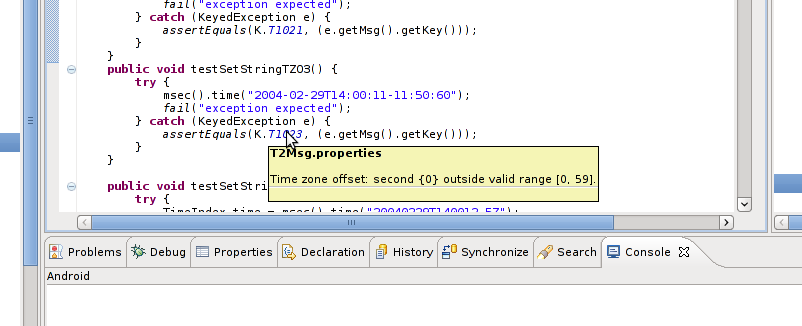
  3. Messages are now keyed symbolically instead of literally. This provides many benefits to the programmer. One of these is readily visible in the Eclipse IDE where the text of the diagnostic message is displayed as a tooltip when the mouse pointer idles over a message key. The screenshot below shows this in action.

.

As an aside, the snapshot shows a piece of JUnit testing code. Writing software is easier and faster with test-first development. JUnit is a simple and powerful testing pattern for Java. We can thank Beck and Gamma for it. Note that the original idea was developed for Smalltalk by Kent Beck in 1989 and thus predates Java.

Coming soon

A data management system for time series running on top of the Time2 Library is in the pipeline. I hope to release it one of these weeks...

Monday, October 3, 2011

Why make it complicated when you can make it impossible?

Dates and times may be quite familiar but when you need to do something with them, especially in software, you are confronted with a glorious mess. To get an idea, spend a few moments on the subject in Wikipedia, Google, or the Java documentation. Here are some of the things you will find.

There is no year zero, except when there is one...

If you are a historian, there is no year 0. The year AD 1 immediately follows the year 1 BC (see Anno Domini in Wikipedia). On the other hand, if you are an astronomer, there is a year 0 (see Astronomical year numbering in Wikipedia). In the ISO 8601 international standard for representing dates and times, years are represented by four digits from 0000 to 9999. So, if you are following the standard, there is a year 0. But with XML, there is a problem. XML time was inspired by an early version of ISO 8601 and disallows year 0. Fortunately, this is likely to change in the future to agree with more recent versions of ISO 8601. See XML Schema Part 2: Datatypes Second Edition from W3C.

If you have an ancestor born on October 10, 1582, stick to the ISO standard!

In some countries, October 15, 1582 immediately followed October 4 (see Gregorian calendar in Wikipedia). The ISO 8601 international standard states that every date must be consecutive and that dates before October 15 1582 can be used by mutual agreement when exchanging information. So, under the standard, there would have been no hole between October 4 and 15, 1582, and your ancestor would have been born on an existing day.

Some minutes have 61 seconds

Nowadays, time is measured with atomic clocks (see Coordinated Universal Time (UTC) in Wikipedia). Atomic time does not exactly match the earth's rotation and a so-called leap second can be added or substracted from UTC at the end of June or December to avoid the discrepancy growing beyond a second. So, minutes have 59, 60, or 61 seconds. For more information on leap seconds, consult Date and Time on the Internet: Timestamps (RFC3339) at the IETF, and Leap Seconds at the US Naval Observatory. Note because it is not known long in advance when one will be introduced, leap seconds cannot be programmed in software.

Avoid the Dutch calendar between 1909 and 1937

When using local time, time zones and daylight savings time are issues to consider. The fact that most methods of the Java Date class are deprecated shows that getting such things right is not straightforward. Calendar and Joda Time are better, but their complexity can be seen as further proof that dates and times are messy. The ISO 8601 standard attempts to sidestep the whole question by not supporting time zones at all. Time is either local or expressed as an offset from UTC. But even then, there is a problem. The offset used by the ISO standard is in hours and minutes. But there are known cases where this is not sufficient. Here is a quote from RFC 3339:

1937-01-01T12:00:27.87+00:20

This represents the same instant of time as noon, January 1, 1937,
Netherlands time. Standard time in the Netherlands was exactly 19
minutes and 32.13 seconds ahead of UTC by law from 1909-05-01 through
1937-06-30. This time zone cannot be represented exactly using the
HH:MM format, and this timestamp uses the closest representable UTC
offset.

The Y2.038K problem

If you thought the year 2000 problem was interesting, then you will like 2038, when the Unix clock will wrap around. Such problems and many facts about dates and times are documented in Gilbert Healton's The Best of Dates, The Worst Of Dates.

Time and the Time2 Library

When I wrote the Time2 Library, I was looking for something lightweight to represent dates and the time of day. Dates and times are only a small part of what the library does and I did not want to spend too much time on time. But I was not happy with Java's Date because it is mostly deprecated. Other possible solutions were not exactly lightweight. So I decided to write my own solution and to keep it simple, with the requirement to implement part of the ISO 8601 specification (ignoring durations and intervals): all years between 0000 and 9999 valid, no hole in October 1582, no support for time zones and daylight savings time, but tolerance for time zone offsets and leap seconds (the last two things are still on the to-do list.)